


You need a wireless CarPlay adapter that works well in very cold weather. Tests show that Carlinkit Mini Ultra 3, AAWireless TWO+, and CARLUEX PRO + 2.0 work well on icy roads. You also need to watch for space weather, because it can change navigation and connection. The NOAA Scales give you updates about solar storms and radio blackouts right away. For your next trip, read this wireless CarPlay adapter review to pick the safest and most reliable one.
What About Key Takeaways?
-
Pick a wireless CarPlay adapter that works in very cold places. The Carlinkit Mini Ultra 3 and CARLUEX PRO + 2.0 are good choices.
-
Look at the temperature range of your adapter before you buy it. Some adapters do not work when it gets really cold.
-
Use NOAA Scales to learn about space weather. This helps you stay away from places with weak GPS and radio signals.
-
Try your adapter at home before you go on your trip. This makes sure it works right and helps you not have problems while driving.
-
Use CarPlay to help you drive safely and talk to people. It lets you make calls and get directions without using your hands, so you can pay attention to the road.
What Features Matter Most for Wireless CarPlay Adapters in Extreme Cold?
Cold-Weather Durability
You need a wireless CarPlay adapter that works in freezing weather. Cold can make electronics slow or stop. In the Arctic Circle or northern Canada, it gets colder than -30°F. Some adapters freeze or lose power when it is this cold. Pick adapters that work in a wide range of temperatures. Always read the product specs before buying. The Carlinkit Mini Ultra 3 works well in very cold places. You want your device to turn on every time, even after a snowy night.
Reliable Connectivity and Safety
Good connection helps keep you safe on icy roads. If your adapter disconnects, you could miss important directions or emergency calls. Wireless CarPlay lets you use maps, music, and calls without plugging in your phone. Experts test how well adapters hold a signal in faraway places. Pick an adapter that uses both 2.4GHz and 5GHz Wi-Fi. This can help stop other devices from causing problems. Always try your adapter before a long drive.
Space Weather Awareness with NOAA Scales
Space weather can change your road trip. Solar storms can mess up GPS, radio, and wireless signals. The NOAA Scales help you know about space weather dangers. These scales show how strong solar flares, radiation storms, and geomagnetic storms are. You can check the NOAA Scales for live updates before and during your trip. This helps you pick safer roads and stay away from places with bad signal. Stay updated by using apps or devices with NOAA Scales info.
Tip: Always check both the weather forecast and the space weather report before you go see the Aurora Borealis.
How Does CarPlay Improve Aurora Borealis Road Trips?
Navigation and Safety
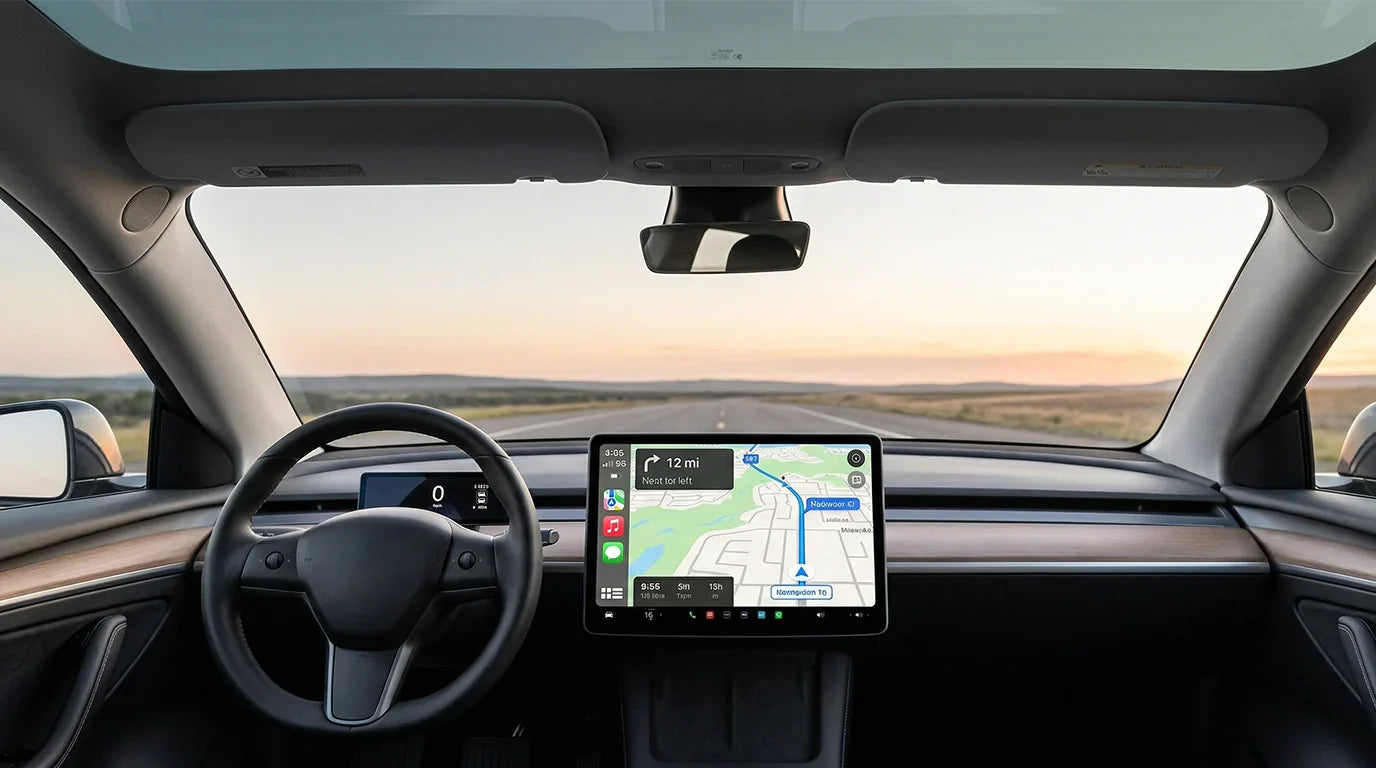
You need clear directions when driving in cold places. CarPlay helps you find your way if snow covers signs. Apple Maps gives spoken directions so you can listen. This helps you keep your eyes on the road. You can ask Siri for a new route if there is a snowstorm. CarPlay lets you call for help without touching your phone. This makes your trip safer, especially where help is far away.
Tip: Always check your route on CarPlay before you leave. Download offline maps if you think the signal will be weak.
Entertainment and Communication
 CARLUEX AIR is one of the easiest ways to add wireless CarPlay. Browse CARLUEX wireless adapters to find the right fit for your car.
Long drives in cold areas can feel lonely. CarPlay gives you music, podcasts, and audiobooks to enjoy. You can use your voice to play songs or call your family. Siri lets you send messages without taking off your gloves. This keeps you connected and focused on driving. The table below shows how CarPlay features help you on your trip:
| Feature | Benefit for Travelers in Remote Regions |
| Siri Integration | Hands-free communication keeps you connected without distractions |
| Music and Navigation | Access to music and navigation by voice, important for long drives in isolated areas |
| Apple Maps | Spoken directions help you travel safely through unfamiliar terrain |
You can read a wireless CarPlay adapter review to find the best device. Pick one that works well in cold weather and supports these features.
Wireless CarPlay Adapter Review: Which Models Excel in Extreme Cold?
Carlinkit Mini Ultra 3
You want an adapter that works in very cold weather. Carlinkit Mini Ultra 3 is known for working in all kinds of weather. It works when it is as cold as -4°F and as hot as 140°F. You do not have to worry about your device stopping during a snowstorm or cold snap.
-
Works in both freezing and hot weather
-
Keeps maps and calls connected
-
Easy to set up in most cars
This adapter is good for long drives in cold places. Many people pick it because it works well in tough weather.
AAWireless TWO+
AAWireless TWO+ lets you use CarPlay without any wires. You can connect your phone without plugging in a cable. It uses both 2.4GHz and 5GHz Wi-Fi, so your signal stays strong even if other devices are close.
-
Simple wireless setup
-
Uses two Wi-Fi bands for better signal
-
Works with lots of car models
You can trust AAWireless TWO+ for most winter trips. It works well in the cold, but always check if it fits your car before buying.
CARLUEX PRO + 2.0
CARLUEX PRO + 2.0 has special features for your trip. It starts up fast and has smooth touch controls. You can use it with Apple CarPlay or Android Auto, so it works with different phones. You can add more storage and get online with a SIM card or Wi-Fi.
This adapter is different because it shows space weather updates. You can see live NOAA Scales updates on your dashboard. This helps you know about solar storms or radio blackouts that could change your signal or navigation.
Note: You can use split-screen mode to see maps and weather at the same time. This helps you stay safe and know what is happening on the road.
Ottocast (Cold Weather Limitations)
Ottocast adapters work well when it is not too cold. Some people say the device disconnects or gets slow when it is freezing. If you want to drive in very cold places, you might want to pick a different adapter from this review.
| Adapter | Cold-Weather Performance | Unique Feature |
| Carlinkit Mini Ultra 3 | Excellent | All-weather reliability |
| AAWireless TWO+ | Good | Dual-band Wi-Fi |
| CARLUEX PRO + 2.0 | Excellent | Space weather integration |
| Ottocast | Limited | Simple setup |
You can use this review to compare the best adapters for your next Aurora Borealis trip.
What About Technical Specs and Compatibility of Top Adapters?
Supported Vehicles and Devices
You want your wireless CarPlay adapter to work with your car and phone. Most top adapters, like Carlinkit Mini Ultra 3, AAWireless TWO+, and CARLUEX PRO + 2.0, support many car brands and models. You can use them with Apple iPhones and Android phones. Some adapters need your car to have a touchscreen or a USB port. Always check the list of supported vehicles before you buy.
Tip: Visit the adapter’s official website to see if your car model is on the list.
| Adapter | Car Compatibility | Phone Compatibility |
| Carlinkit Mini Ultra 3 | Most cars with CarPlay | iPhone |
| AAWireless TWO+ | Most cars with CarPlay | Android, iPhone |
| CARLUEX PRO + 2.0 | Touchscreen head units | Android, iPhone |
Operating Temperature Ranges
You need an adapter that works in extreme cold. Cold weather can make some devices stop working. The Carlinkit Mini Ultra 3 works from -4°F to 140°F. AAWireless TWO+ also handles cold, but check the specs for your model. CARLUEX PRO + 2.0 uses a strong chip and heat sink, so it stays reliable in freezing weather.
Note: Always check the temperature range in the product manual before your trip.
Setup and Installation
You can set up most wireless CarPlay adapters in a few steps. Plug the adapter into your car’s USB port. Follow the instructions on your phone or car screen. For CARLUEX PRO + 2.0, you may need to calibrate the screen once. You can connect to Wi-Fi or use a SIM card for more features. If you have trouble, check the user manual or contact support.
Action: Test your adapter at home before your road trip. This helps you avoid problems on the road.
What About Wireless CarPlay Adapter Comparison for Cold Weather?

Feature and Performance Table
It is important to know how each adapter works in cold. The table below shows the main features and how well each device works when it gets cold outside. This makes it easy to compare them.
| Adapter | Cold Weather Range | Space Weather Alerts | Dual-Band Wi-Fi | Fast Boot | Split-Screen | CarPlay & Android Auto |
| Carlinkit Mini Ultra 3 | -4°F to 140°F | No | Yes | Yes | No | CarPlay only |
| AAWireless TWO+ | -4°F to 122°F | No | Yes | Yes | No | Yes |
| CARLUEX PRO + 2.0 | -22°F to 140°F | Yes | Yes | Yes | Yes | Yes |
| Ottocast | 14°F to 122°F | No | Yes | Yes | No | Yes |
Tip: Always look at the temperature range before you buy an adapter for a winter trip.
Pros and Cons
You should know what each adapter does well and where it is weak. This list helps you see the good and bad points.
-
Carlinkit Mini Ultra 3
-
✅ Works in very cold and hot places
-
✅ Easy to set up
-
❌ Only works with CarPlay
-
-
AAWireless TWO+
-
✅ Works with both CarPlay and Android Auto
-
✅ Has dual-band Wi-Fi for a strong signal
-
❌ Might not work in very cold weather
-
-
CARLUEX PRO + 2.0
-
✅ Gives live space weather alerts
-
✅ Works in very cold weather
-
✅ Lets you use split-screen for maps and weather
-
✅ Has fast and smooth touch controls
-
-
Ottocast
-
✅ Simple to use
-
❌ Does not work well in very cold weather
-
You can use this wireless carplay adapter review to help you pick the best device for your Aurora Borealis road trip. Always make sure the adapter fits your car and your travel plans.
What About Common Issues and Tips for Extreme Cold Use?
Connectivity Problems
Your wireless CarPlay adapter might lose connection in very cold weather. Cold can make electronics slow down and Wi-Fi signals weak. If you drive where it is colder than -20°F, your adapter might stop working or get slow. Always check the adapter’s temperature range in the manual. Real-world tests show CARLUEX PRO + 2.0 and Carlinkit Mini Ultra 3 work well even when it is freezing.
Tip: Do not put your adapter right by cold air vents. This helps keep it warm and working well.
If your CarPlay screen freezes or loses signal, restart the adapter. You can also try to reconnect your phone. Moving your phone closer to the adapter can help the signal.
Maintenance and Troubleshooting
You should take care of your adapter so it works in the cold. Clean the USB port and adapter often. Dust and water can cause problems. Wipe the adapter with a dry cloth. If your device stops working, check the cables and connections first. CARLUEX PRO + 2.0 lets you send system logs for remote help. This helps engineers fix problems faster.
| Problem | Solution |
| Adapter freezes | Restart device |
| Signal drops | Move phone closer, check vents |
| No power | Inspect cables and USB port |
Action: Test your adapter before every trip. Keep a spare cable in your car. If you have problems, contact support or use the troubleshooting guide in the manual.
What Is the Best Wireless CarPlay Adapter for Aurora Borealis Road Trips?
Top Recommendation
If you want the best wireless CarPlay adapter for your Aurora Borealis trip, experts say the CARLUEX PRO + 2.0 is a great pick. This adapter works even when it is super cold, down to -22°F. It gives you live space weather alerts, so you know if solar storms might cause signal problems. You can use both Apple CarPlay and Android Auto with this device. It also lets you see maps and weather at the same time with split-screen mode.
The National Oceanic and Atmospheric Administration (NOAA) says space weather can mess up GPS and wireless signals. The CARLUEX PRO + 2.0 helps you stay safe and know what is happening.
Action: Pick this adapter if you want the best cold-weather performance and live space weather updates on your dashboard.
Choosing Based on Your Needs
Pick an adapter that matches your car, phone, and how you travel. Here is an easy guide:
| Your Priority | Best Choice |
| Extreme cold and safety | CARLUEX PRO + 2.0 |
| Simple setup | Carlinkit Mini Ultra 3 |
| Android phone compatibility | AAWireless TWO+ |
If you drive where it gets very cold, choose an adapter that works in low temperatures. If you want something easy, pick a model that is simple to set up. For Android phones, make sure your adapter works with Android Auto.
Tip: Always check if your car works with the adapter before you buy. Try your adapter at home before your trip.
You need a wireless CarPlay adapter that works in very cold weather. It should keep you connected and help you stay safe. Cold-weather reliability is important for your trip. Live space weather updates from NOAA Scales help you know what is happening. Wireless CarPlay means you do not need cords everywhere. This makes it easier to use gloves and gear. Features like 360° Surround View and Blind-Spot View Monitors help you drive safely near snowbanks. For the best trip, pick CARLUEX PRO + 2.0. You can also check NASA’s Space Weather Program for more tips about safe winter travel.
FAQ
What is space weather, and why does it matter for road trips?
Space weather means changes in the sun’s activity, like solar storms. These events can affect GPS and radio signals. The NOAA Scales track these changes. You should check space weather before your trip to avoid signal problems.
How do I know if my adapter works in extreme cold?
You can find the operating temperature in the product manual or on the brand’s website. For example, CARLUEX PRO + 2.0 works down to -22°F. Always test your adapter at home before your trip.
Can I use wireless CarPlay with Android phones?
Yes, some adapters support both Apple CarPlay and Android Auto. CARLUEX PRO + 2.0 and AAWireless TWO+ work with Android phones. Check your adapter’s specs to make sure it fits your device.
What should I do if my adapter loses connection in the cold?
Restart your adapter and move your phone closer. Cold can weaken signals. Data from real-world tests shows that keeping the adapter away from vents helps. Always carry a spare cable for backup.
Where can I check live space weather updates for my trip?
You can visit the NOAA Space Weather Prediction Center website. The NOAA Scales give real-time alerts about solar storms and radio blackouts. Check these updates before and during your road trip for safety.


Lasă un comentariu
Toate comentariile sunt moderate înainte de a fi publicate.
Acest site este protejat de hCaptcha și hCaptcha. Se aplică Politica de confidențialitate și Condițiile de furnizare a serviciului.