

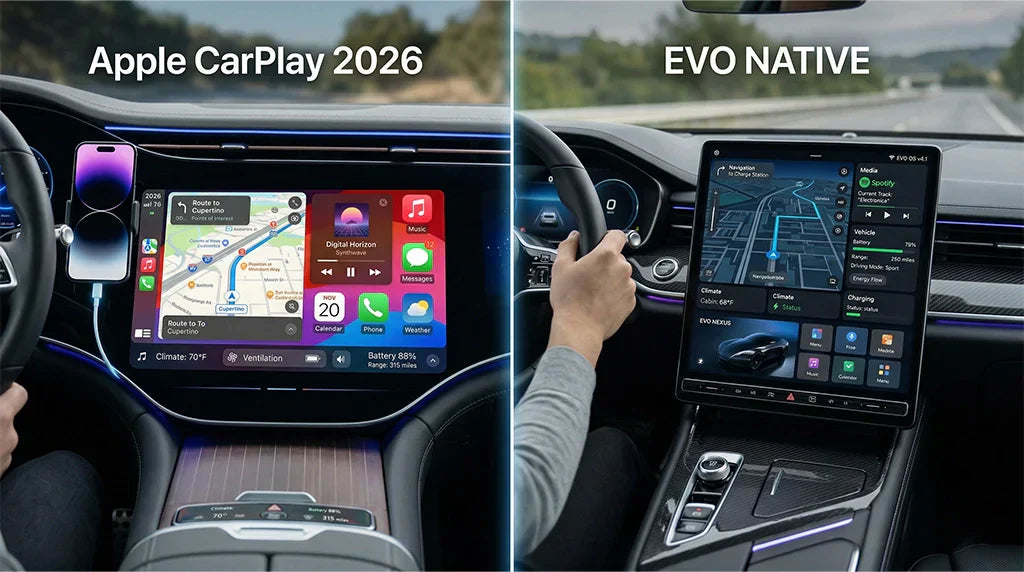
If you want the best system for your electric car in 2026, apple carplay android auto are top choices to consider. Apple CarPlay is very popular and easy to use, while Android Auto is growing fast and offers excellent Google services, along with more customization options. Native systems from GM and Ford work well with their cars, allowing automakers to add unique features. CARLUEX PRO adds wireless CarPlay instantly. CARLUEX AIR supports both wireless CarPlay and Android Auto. Browse CARLUEX wireless adapters to find the right fit for your car.
With gas prices rising, more people are switching to EVs, making the decision about your infotainment system even more important. Think about your phone, your driving habits, and what apple carplay android auto can do to make your daily routine easier.
What About Key Takeaways?
-
Apple CarPlay and Android Auto let your phone work with your electric car. They make it easier and safer to use maps, music, and charging.
-
Android Auto lets you change more things and see more EV details. Apple CarPlay is simple and looks like your iPhone if you use one.
-
Native systems in electric cars work closely with car controls. They give special features and can update by themselves through the internet.
-
All systems have voice control and hands-free use. These help you pay attention to driving and make it safer.
-
Picking the best system depends on your phone, how you drive, and what features you want most for your electric car.
What About Apple CarPlay Android Auto: Quick Comparison?
Key Features
Apple CarPlay and Android Auto are very popular for electric cars. These systems help your phone connect to your car easily. Apple CarPlay shows icons in a grid. Android Auto uses cards and split-screen. Siri is the voice helper for CarPlay. Google Assistant is the helper for Android Auto. Both let you use maps, play music, and check the weather.
Apple CarPlay Ultra is even better for iPhone users. Android Auto now uses Gemini AI for smarter tools. You can get directions, play songs, and see weather without looking away from the road. These features make your car’s screen feel like your phone.

-
Easy phone connection
-
Directions on your screen
-
Listen to music and see weather
-
Use voice helpers
-
Quick access to apps
EV Compatibility
You want your car’s screen to work well with your electric vehicle. Apple CarPlay and Android Auto keep getting better for EVs. You can find charging stations and check battery levels. You can also change climate settings from your car’s screen. Android Auto shows lots of battery and charging info. Apple CarPlay is adding better EV routes in Apple Maps.
Most big brands like Ford, Hyundai, Kia, Volkswagen, and BMW support both systems. Some new cars from GM and Rivian do not. Always check if your car works with these systems before buying.
Tip: If you drive a Hyundai Ioniq 5 or Ford Mustang Mach-E, you can use both Apple CarPlay and Android Auto fully.
Comparison Table
Here is a simple table showing how Apple CarPlay and Android Auto compare for electric cars:
|
Feature |
Apple CarPlay (2026) |
Android Auto (2026) |
|---|---|---|
|
Device Compatibility |
iPhone 5s or higher (iOS 13+) |
Android 8.0 or higher |
|
Interface |
Grid dashboard |
Split-screen cards |
|
Voice Assistant |
Siri |
Google Assistant |
|
Navigation |
Apple Maps, Google Maps |
Google Maps, Waze, HereWeGo |
|
Third-Party Apps |
Curated, strict |
Open, many choices |
|
Customization |
Some |
Lots |
|
EV Integration |
Getting better (EV routes) |
Deep (battery/charging) |
|
Connection |
Wired or wireless |
Wired or wireless |
Both Apple CarPlay and Android Auto connect your phone to your car well. Android Auto lets you change more things and shows more EV info. CarPlay is simple and easy for iPhone users. As gas prices go up and more people buy EVs, picking the right system makes driving easier. Think about which phone you use, which maps you like, and how much you want your car and phone to work together.
What About Apple CarPlay for Electric Vehicles?
User Experience
You want your car’s screen to be simple to use. Apple CarPlay makes the screen look like your iPhone. The icons are big and easy to see. Menus are not confusing. You can swipe or tap to pick what you want. You can also talk to control things. Apple CarPlay helps you connect your phone to your car fast.
It loads quickly and works without wires. You can check your battery and change the temperature from the dashboard. Apple CarPlay makes sure your apps work together. Every time you drive, it feels easy and smooth.
Navigation and Charging

Apple CarPlay helps you find your way in your electric car. You can use Apple Maps or other map apps. It shows you traffic and charging spots as you drive. CarPlay Ultra makes maps even better. It connects to your car’s screens and air controls. All your map info is in one place. You can plan trips and add charging stops. Apple CarPlay helps you skip traffic and find chargers fast. This keeps your drive easy and calm.
"This all-in-one system makes driving better for EV owners. It puts all the controls and info in one Apple-designed screen."
App Integration

Apple CarPlay is great at using your favorite apps. You can play music, listen to podcasts, and send messages. The system has many features but is still simple. You can check messages and get directions without getting distracted. The screen looks like your phone, so it feels familiar. Apple CarPlay makes sure your apps work well together. You get traffic updates and maps in real time.
You can enjoy your drive with all the tools you need. Apple CarPlay helps you see important info while you drive.
-
Apple CarPlay Ultra works with all screens, even the instrument cluster and climate controls.
-
The interface takes over from the car’s own software, so it looks the same in different cars.
-
The system works without wires and loads fast, making it easy to use.
What About Android Auto for Electric Vehicles?
Interface and Customization
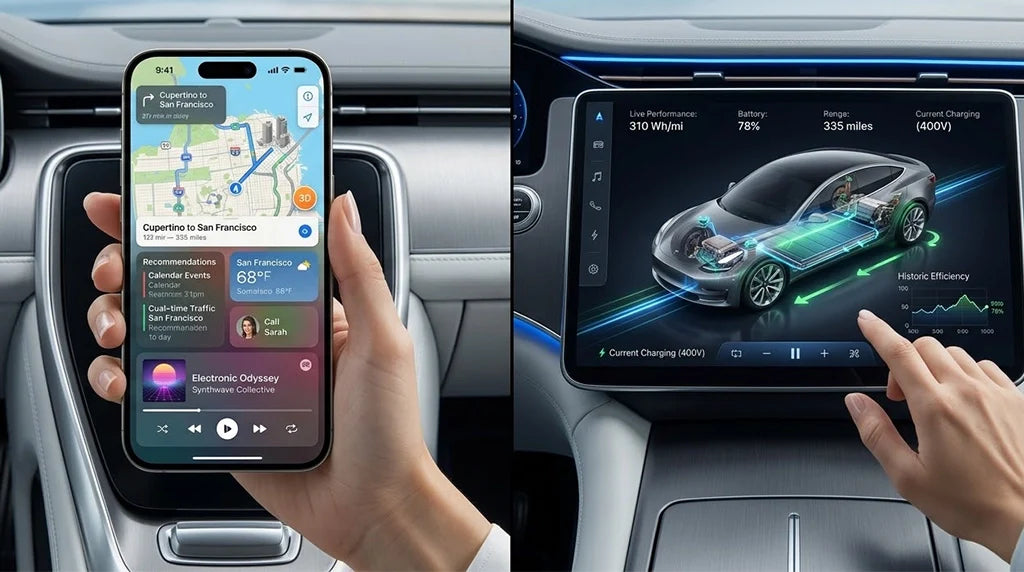
When you use android auto in your electric car, you notice the look right away. The screen feels like your Android phone. You see your favorite apps on the car’s screen. You can move or pin apps where you want them. This lets you make the system feel personal. The screen changes color for day or night. You can add widgets for music, maps, or charging.
Android auto works with your car’s controls. You can change the temperature or check the battery with Google Assistant. This gives you more control than most built-in systems.
|
Feature |
Android Auto |
Native Systems in EVs |
|---|---|---|
|
Flexibility |
More flexible and functional |
Generally less flexible |
|
Integration |
Deeper integration with vehicle systems |
Limited integration |
|
Customization |
Highly customizable UI |
Often less customizable |
|
Control over user experience |
Manufacturers may restrict features |
More control over user experience |
Navigation and Google Services
Android auto is great for navigation. You get directions from Google Maps or Waze. The system finds charging stations that fit your car’s plug. It gives you routes in just a few seconds. Google Maps checks your battery, car weight, and road type to pick the best way. You see charging spots on your route with info like speed, price, and plug type.
Google services let you ask Google Assistant for help. It can suggest charging stops or change your route if traffic is bad. You get alerts about charging or if a station is open. This makes driving easy and less stressful.
-
Find charging stations near you or on your trip
-
See live info about station speed, price, and plug
-
Get voice directions and traffic news
-
Use Google Assistant for hands-free help
App Ecosystem
Android auto has lots of apps. You can play music, listen to podcasts, send messages, and use maps. For EV drivers, apps like ChargePoint help you find and start charging at stations from your car’s screen. You can sort stations by speed, price, or if they are open. The screen shows your favorite and recent stations. This helps you plan trips easily.
You can start charging with one tap. Google services and other apps work together smoothly. Android auto reads messages out loud and blocks unimportant alerts. This helps you keep your eyes on the road. You can pick which apps send alerts, so you do not get distracted.
Tip: If you want a system that gets better with updates, android auto’s apps and Google services make it a good choice for EV drivers.
What About Native Systems in 2026?

EV Features
When you check out native infotainment systems in 2026, you notice automakers want everything to work together easily. These systems put energy use, trip planning, climate control, Autopilot settings, and charging all in one place. You can plan your trip, see your battery level, and find charging stations on the same screen. The navigation tools help you guess how much battery you will have left.
They can also warm up your battery for faster charging. You can start and watch charging right from the screen. The system shows how things like speed or hills change your range. Over-the-air updates add new features, so your system keeps getting better.
|
Feature Description |
|---|
|
All your car’s main controls are in one easy screen. |
|
The trip planner helps you find Superchargers and tells you how much battery you’ll have and how long charging will take. |
|
You can find, start, and watch Supercharger charging from the screen, and the car can warm up the battery for faster charging. |
|
The trip planner can pick DC fast chargers, guess your battery at arrival, and warm up the battery for good charging. |
|
The system shows how using heat, speed, or going up hills changes your battery range. |
|
Updates come over the air, making your car smarter and easier to use. |
Manufacturer Innovations
In 2026, car makers build their own infotainment systems. They want to keep your data safe and make their cars special. You see better voice control and smart AI helpers. Japanese brands use smart voice assistants and new software. Porsche adds an App Center for games and other apps in the Macan. Mercedes-Benz has MB.OS with a big Hyperscreen and AI from Microsoft and Google.
BMW uses Alexa+ for talking to your car in a natural way. These new ideas make the screens smarter and more fun. You get cool sound, touchscreens that know when you are close, and different systems for different countries.
-
Porsche: App Center, games, Dolby Atmos sound.
-
Mercedes-Benz: MB.OS with Hyperscreen, Microsoft and Google AI.
-
BMW: Alexa+ for talking to your car.
-
Japanese brands: Smart voice control and AI helpers.
Hardware Integration
Native systems in 2026 mix hardware and software really well. Your car acts like a smart device with updates and cloud help. Car makers use Qualcomm Snapdragon to connect everything and help the car drive itself. Over-the-air updates give you new features without going to the dealer. Cloud-based systems let your car get updates safely and fast. Generative AI helps make better car designs and smarter maps.
Your car’s system grows and changes with you. The screen works smoothly, and the car stays connected to the internet.
|
Aspect |
Description |
|---|---|
|
Software-Defined Vehicles |
Cars are built to change and get better with cloud updates. |
|
Over-the-Air (OTA) Updates |
Makers can send updates to your car without you going to the dealer. |
|
Cloud Integration |
Car companies work with tech firms to make cloud systems and earn money from data. |
|
Generative AI Integration |
AI is important for building new car systems. |
|
Cloud-Native Development |
Updates are tested and sent out in steps to keep your car safe. |
Note: Car makers now talk about building or buying voice AI, thinking about cost and how well it fits their cars.
You can see that native infotainment systems in 2026 give you lots of features, strong connections, and smart maps. These systems keep getting better, so you have more control and your electric car works even smoother.
What About Safety, Reliability, and Ease of Use?

Hands-Free Operation
You want your infotainment system to help you stay safe. Apple CarPlay and Android Auto let you use voice control. You can ask for directions, play music, or send messages without touching the screen. This keeps your eyes on the road. CarPlay only lets you use certain apps, so it is simple and less distracting. Android Auto lets you change more things, but sometimes it disconnects.
This can make navigation and talking harder. Native systems in electric vehicles can change climate or battery settings by themselves. This helps you keep your hands on the wheel and makes driving easier.
Tip: Using voice control and simple screens makes driving safer and easier. It helps you get directions or use features quickly.
System Updates
You do not want your system to get old. Over-the-air updates help Apple CarPlay, Android Auto, and native systems stay new. These updates fix bugs and add features without going to the dealer. Updates use special codes to keep your car safe from hackers. You get new ways to connect, better maps, and more options. Fast updates mean your system works well and your electric car gets smarter.
Native systems update for new hardware. CarPlay and Android Auto update apps and screens.
-
OTA updates make your system safer and more reliable.
-
Updates fix problems fast and add new things.
-
You save time and your system works better.
Accessibility
You want everyone to use the infotainment system easily. Apple CarPlay, Android Auto, and native systems have features for people with disabilities. They offer Braille keyboards, captions, Google’s TalkBack, and voice control. These tools help users get directions, play music, and use other features. You can use your voice to control climate or find routes. The screen changes to fit your needs. This makes the system more fun and easy for everyone.
|
System |
Safety Implications |
|
|---|---|---|
|
Apple CarPlay |
Works well because it checks devices and apps. |
Less chance of losing navigation or messages while driving. |
|
Android Auto |
Sometimes disconnects and has trouble with some devices. |
More risk if navigation or messages stop working while driving. |
|
Native Systems |
Connects deeply with car parts and software. |
Safer because it can change settings and works smoothly. |
You get a safe, reliable, and easy-to-use infotainment system with Apple CarPlay, Android Auto, or native systems. Each one has special features, so your electric car keeps you connected and comfortable.
What About Future Trends for Apple CarPlay Android Auto and Native Systems?
Evolving EV Features
Infotainment and navigation are changing a lot as electric vehicles get more popular. Apple CarPlay and Android Auto now work better with your car’s systems. You can control charging, check battery status, and change climate settings right from the screen. Navigation now shows live charging station info and battery range. It can even pick the best route for your electric vehicle.
CarPlay Ultra and new Android Auto updates make the dashboard feel smooth and easy to use. Native systems go even further, letting you control everything about your electric vehicle from one screen.
|
Brand |
|
|---|---|
|
Ford |
Supports CarPlay in Mach-E, F-150 Lightning |
|
Hyundai & Kia |
CarPlay in Ioniq, EV6 |
|
Volkswagen |
CarPlay in ID.4 and more |
|
Volvo & Polestar |
CarPlay via Android Automotive |
|
GM |
Dropping CarPlay for own infotainment |
|
Rivian |
Own interface, no CarPlay |
|
Tesla |
Testing wireless CarPlay |
|
Luxury Brands |
Usually support CarPlay, check trims |
Software Longevity
You want your infotainment system to last as long as your car does. Apple CarPlay and Android Auto get updates often, so your maps and features stay new. Over-the-air updates add new things and fix problems. Native systems also use cloud updates, but some brands like GM and Rivian will stop using CarPlay and Android Auto. They want to control how their systems work and collect data for new technology.
This means you should check if your car supports these systems before you buy it. If you like using your phone’s screen in your car, pick a brand that still has CarPlay or Android Auto.
-
General Motors will not have CarPlay or Android Auto in new electric vehicles.
-
Rivian uses its own system and never had these platforms.
Note: Car makers want more control over their systems, so they build their own.
Smart Home Integration
Smart home features are becoming very important. You can connect your car’s system to your home devices. You might turn on your house lights or set the thermostat from your car’s screen. Apple CarPlay and Android Auto now let you use voice commands to control your home. Native systems are also adding smart home tools. Now, your car and home work together, making life easier. You get more features, better connections, and a smoother experience every year.
What About Choosing the Best System for EV Owners?
Tech Enthusiasts
You like new tech and want your electric car to feel smart. You care about how things work together and look on the screen. You want updates to come fast and want your favorite apps to work well. You also want to control everything from one spot and see how all the features connect.
Here’s a quick way to compare:
|
Infotainment System |
Key Features |
User Interface |
Physical Controls |
|---|---|---|---|
|
Apple CarPlay |
Works well with navigation apps |
Fast, easy to use |
Buttons for climate control |
|
Android Auto |
Google Maps built-in |
Looks good, responds fast |
Works with car’s controls |
|
Native Systems |
Simple and quick |
Easy to find things |
Controls for main functions |
Look for these things:
-
Easy-to-use screen
-
Fast touch response
-
Buttons for climate and volume
-
Works with maps and charging apps
-
Updates that add new features
Apple CarPlay is good if you use an iPhone. It gives you fast maps, easy music, and a screen that looks like your phone. Android Auto is better if you want to change things and use Google tools. You can set up the screen your way and use special map features. Native systems work well with the car’s hardware but may not have as many apps.
If you want both, try the new device that uses Apple CarPlay and Android Auto. It makes your car’s screen look like a tablet. You get smooth use, fast start-up, and can download apps from the Play Store. You can split the screen for maps and music at the same time. The device gets updates over the air, so it keeps getting better.
It has strong GPS and works with many cars. This is great if you want lots of features and high performance.
Commuters
You drive a lot to work or school. You want your infotainment system to make your day simple and safe. You need hands-free tools, good maps, and help with your calendar and messages. You want to keep your eyes on the road.
Commuters want:
-
Hands-free calls and texts
-
Calendar reminders
-
Fast and good maps
-
Simple screen for quick use
-
Reliable connection every day
Apple CarPlay helps you with Siri. You can ask for directions, send texts, or check your schedule without using your hands. The screen is simple, and it works well with your iPhone. Android Auto gives you Google Assistant. It can read your texts, suggest routes, and help you find charging spots. The maps are strong, and you can change the screen to show what you need.
Native systems in electric cars have built-in maps and voice control. You can use the car’s hardware to change the temperature or check the battery. Some systems even warm up the battery before you get to a charger.
If you want more choices, the new device with Apple CarPlay and Android Auto is a good pick. You can switch between systems based on your phone. The screen is fast, and you get all the tools you need for your drive. The device works with Bluetooth, Wi-Fi, and SIM cards for internet. You can use split-screen for maps and music. Updates come over the air, so your system stays fresh and works well.
Tip: If you want a system that fits your routine, pick one with good integration, easy maps, and regular updates.
Families
You drive with kids or family. You want everyone to be happy and have fun. You need a system that is easy for everyone, works with charging apps, and is simple for all ages. You want a clear screen, good connections, and features for long trips.
Families need:
-
Apps for kids’ fun
-
Easy charging station info
-
Simple screen for all ages
-
Good maps for trips
-
Works with many devices
Apple CarPlay lets you play music, audiobooks, or podcasts easily. The screen is clear, and you can share playlists or let kids pick songs. Maps are easy, and you can find charging stations on your trip. Android Auto gives you many apps, including ones for kids and charging. You can set up the screen with shortcuts for your favorite things.
Native systems have built-in fun and maps. You can use the car’s screens so everyone can see what’s playing or where you’re going. Some let you control the air and music from the back seat.
If your family wants more, the new device with Apple CarPlay and Android Auto is a smart choice. You can download apps, use split-screen for maps and video, and connect many devices. The screen is easy, and everyone can use it. The device plays 4K video, so kids can watch shows in high quality. It works well with your car’s hardware and gets updates for new features.
Note: Every family is different. Pick a system that fits your needs for easy use, good connections, and a fun experience.
No matter who you are—tech fan, commuter, or family driver—you have many choices for your electric car’s infotainment system. Apple CarPlay, Android Auto, and native systems each have special features and ways to connect. The new device with both Apple CarPlay and Android Auto gives you more options, high performance, and a smooth screen. You get good maps, strong connections, and a system that grows with you. Pick the one that fits your life and enjoy every drive.
You can pick from many infotainment systems for your electric car. Apple CarPlay and android auto both make driving simpler. Android auto lets you change your screen in more ways. You can use android auto to find chargers, play music, and get directions. Android auto gets updates often, so it stays new. Native systems work well with your car’s parts, but android auto lets you use your favorite apps.
Android auto connects without wires and works with lots of brands. Android auto helps you plan trips and keeps your family happy. Android auto is simple to use and fits your daily habits. Android auto is a smart choice for tech lovers, people who drive to work, and families.
If you want your car to work fast and do many things, try the new device that uses both Apple CarPlay and android auto. You get a big HD screen, wireless connection, and easy setup. Devices that use both systems are becoming more popular and help your car get ready for new tech.
|
Feature |
Description |
|---|---|
|
Wireless Connectivity |
Works with both Apple CarPlay and android auto |
|
Large HD Screen |
11.5″ HD screen that is easy to see |
|
Built-in Dash Cam |
4K front camera and night vision backup camera |
|
Easy Installation |
Plug-and-play setup, no changes to your dashboard |
-
Devices that use both systems made up 32.2% of market money in 2025.
-
This group is growing by about 14.2% every year.
Think about what matters most to you. You can enjoy owning an electric car for a long time with a system that fits your needs.
FAQ
Can I use Apple CarPlay and Android Auto at the same time?
You can switch between Apple CarPlay and Android Auto, but you cannot use both on the same screen at once. Choose the system that matches your phone. The new device lets you pick either one easily.
How do I find charging stations with these systems?
Both Apple CarPlay and Android Auto show charging stations on your map. You can ask Siri or Google Assistant to find nearby chargers. The screen displays station details like speed and price.
Will my infotainment system get updates?
Yes! Apple CarPlay, Android Auto, and native systems receive updates over the air. You do not need to visit a dealer. Updates add new features and fix problems, keeping your system fresh.
What happens if my phone disconnects while driving?
If your phone disconnects, the system stops showing your apps. Maps and music pause. You can reconnect your phone quickly. Native systems keep working since they do not rely on your phone.
Is it easy for kids or older family members to use?
Yes! The screens use big icons and simple menus. Voice control helps everyone. Kids can play music or watch videos. Older family members can ask for directions or use apps without touching the screen.



Laat een reactie achter
Alle reacties worden gemodereerd voordat ze worden gepubliceerd.
Deze site wordt beschermd door hCaptcha en het privacybeleid en de servicevoorwaarden van hCaptcha zijn van toepassing.