

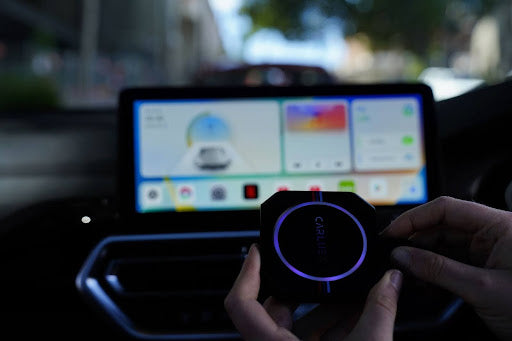
Apple CarPlay does not natively support Netflix — the Netflix app is not available on Apple's CarPlay App Store. However, there are several legitimate ways to watch Netflix on your car's screen, including using the CARLUEX Pro+ or AIR adapters which support screen mirroring and full Android apps. This guide walks you through every method, from the simplest to the most feature-rich.
Important safety note: Watching video content while driving is dangerous and illegal in most jurisdictions. All methods in this guide are intended for use by passengers only, not the driver. Always prioritize road safety.
Is Netflix Available on Apple CarPlay?
No, Netflix is not directly available on Apple CarPlay. Apple's CarPlay guidelines restrict video playback to prevent driver distraction, and Netflix has not released a CarPlay-compatible version of its app. Per Apple's CarPlay Human Interface Guidelines, video playback apps are not permitted on CarPlay. This means you won't find Netflix in the CarPlay App Store, and the Netflix iPhone app won't appear on your car's CarPlay screen even if your car supports CarPlay.
Method 1: Use a CARLUEX Adapter with Screen Mirroring (Recommended)
The easiest and most reliable way to get Netflix on your car's screen is to use a CARLUEX AIR wireless adapter or CARLUEX Pro+ 2.0. Both devices run full Android and support screen mirroring from your phone:
- Connect the CARLUEX adapter to your car's USB port (the same port you'd use for wired CarPlay).
- Download a screen mirroring app such as LetsView, AirDroid, or Castscreen on your iPhone.
- Connect both your iPhone and the CARLUEX adapter to the same Wi-Fi network.
- Open the screen mirroring app on your iPhone and select the CARLUEX device.
- Your iPhone screen — including the Netflix app — will now appear on your car's display.
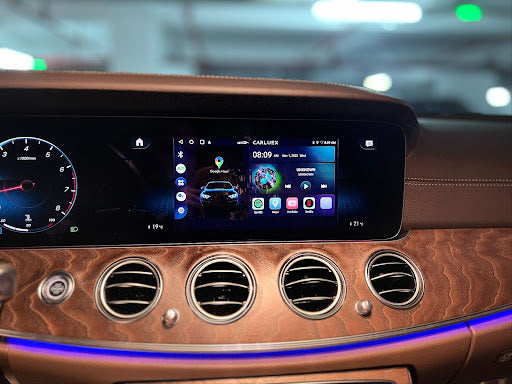
The CARLUEX AIR runs full Android 11 and can also download Netflix directly from the Google Play Store, without needing your phone. The Pro+ 2.0 adds 4K video output and a Qualcomm Snapdragon 6125 processor for smooth playback. See how it works: How to Watch YouTube or Netflix in Your Car — CARLUEX AIR Demo
Method 2: Download Netflix Directly on the CARLUEX Adapter
The CARLUEX AIR and Pro+ models come with Google Play Store access. Once connected to Wi-Fi, you can download Netflix directly on the device:
- Connect your CARLUEX adapter to your car and power it on.
- Connect the adapter to a Wi-Fi network (or use a mobile hotspot).
- Open the Google Play Store on the CARLUEX home screen.
- Search for "Netflix" and install the app.
- Log in with your Netflix account and start streaming directly on your car's display.
This method does not require your phone at all — the adapter handles everything independently. Browse our CarPlay adapters with Netflix support collection to find the right device.
Method 3: Use Safari on CarPlay (Limited Option)
Some CarPlay systems allow you to open Safari and navigate to netflix.com. While this works in theory, it is unreliable: Netflix blocks many browser-based playback sessions, the interface is not optimized for car touchscreens, and some newer CarPlay versions restrict Safari's functionality. This method is not recommended for a good experience.
Method 4: Airplay from iPhone to Car Display
If you have an aftermarket car display that supports AirPlay, you can cast your iPhone screen to that display and play Netflix. However, this requires additional hardware (an AirPlay-compatible display or dongle) and does not work with factory infotainment systems that only support CarPlay.
Which CARLUEX Device Should You Get for Netflix?
Here's a quick comparison:
- CARLUEX AIR ($139): Full Android 11, Google Play Store, direct Netflix/YouTube/Disney+ download, Wi-Fi connectivity. Best for: anyone who wants Netflix on their car screen without needing their phone.
- CARLUEX Pro+ 2.0: Qualcomm Snapdragon 6125, 8GB RAM, 128GB storage, 4K output, CARLUEX OS 2.0. Best for: users who want the highest performance and don't mind the premium price.
- CARLUEX GO: Pre-installed YouTube and Netflix, screen mirroring support, more affordable. Best for: users who primarily want video streaming without the full Android experience.
Frequently Asked Questions
Can I get Netflix on Apple CarPlay?
No, Netflix is not available as a native CarPlay app. Apple does not permit video playback apps on CarPlay. However, you can watch Netflix on your car's screen using a CARLUEX AIR or Pro+ adapter with screen mirroring, or by downloading Netflix directly from Google Play Store on the adapter.
How do I watch Netflix in my car with CarPlay?
The easiest way is to use a CARLUEX AIR adapter: connect it to your car's USB port, connect to Wi-Fi, open the Google Play Store, download Netflix, and stream directly. Alternatively, use screen mirroring from your iPhone to the CARLUEX device.
Is it safe to watch Netflix while driving?
No. Watching video content while driving is dangerous and illegal in most jurisdictions. All methods in this guide are intended for passengers only. If you are the driver, pull over safely before watching any video content.
Do CARLUEX adapters work with any car that has CarPlay?
Yes. The CARLUEX AIR and Pro+ adapters work with any car that supports wired Apple CarPlay, including both factory-installed and aftermarket CarPlay systems.
Can I use my existing Netflix account on a CARLUEX adapter?
Yes. Once Netflix is installed on the CARLUEX adapter, simply log in with your existing Netflix account credentials. Your watch history and profiles will sync just like on any other device.


コメントを書く
このサイトはhCaptchaによって保護されており、hCaptchaプライバシーポリシーおよび利用規約が適用されます。