

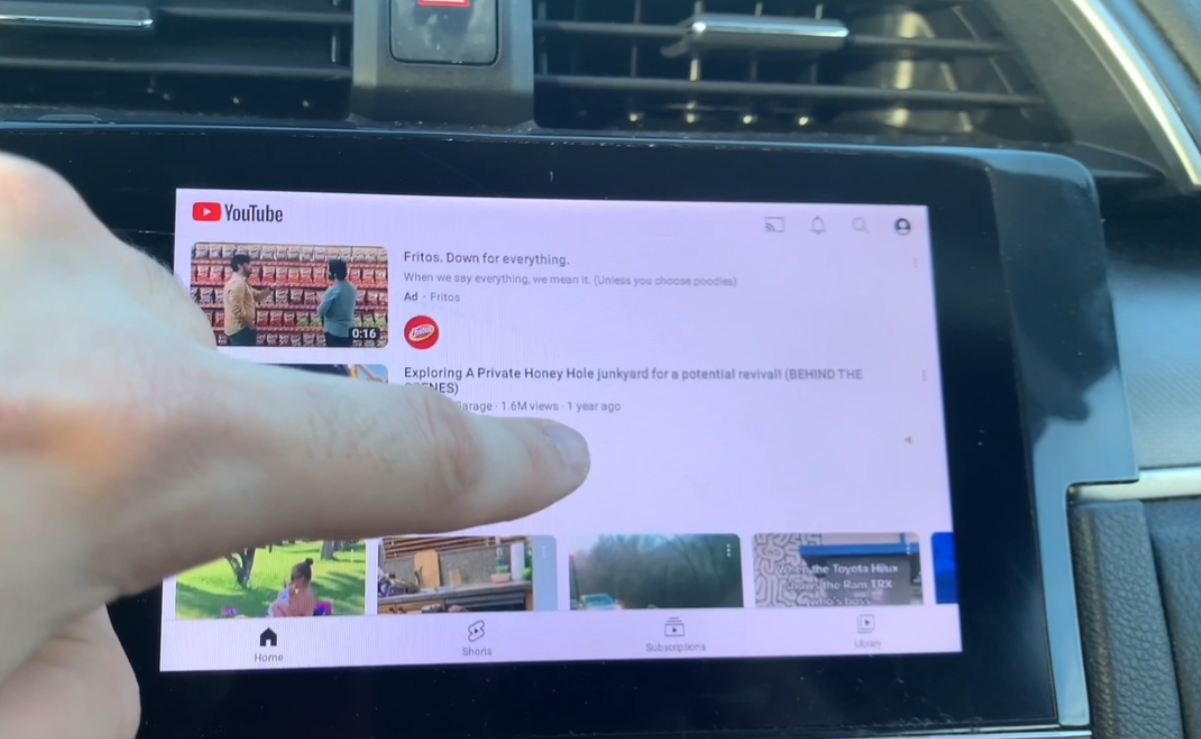
Apple CarPlay does not include YouTube as a native app — Apple's CarPlay guidelines restrict video playback for safety reasons. However, there are several practical ways to get YouTube on your car's infotainment screen, ranging from simple screen mirroring setups to full Android-powered adapters that run YouTube natively. This guide covers every option, ranked by ease of use and video quality.
Safety reminder: YouTube should only be used by passengers, never by the driver. Distracted driving is dangerous and illegal in most states and countries.
Can You Watch YouTube on Apple CarPlay?
Apple CarPlay does not natively support YouTube. Per Apple's CarPlay Human Interface Guidelines, video playback apps are not permitted on CarPlay, and YouTube has not released a CarPlay-compatible version of its app. Even if you can somehow open YouTube through Safari on CarPlay, the experience will be limited and unreliable. The good news: there are better solutions that give you full YouTube access on your car screen.
Method 1: Use a CARLUEX Adapter with Screen Mirroring (Best Experience)
The most reliable way to get YouTube on your car screen is with a CARLUEX AIR wireless adapter or CARLUEX Pro+ 2.0. Both support screen mirroring from your iPhone and also run YouTube as a native Android app.
Option A: Screen Mirroring from Your iPhone
- Plug the CARLUEX adapter into your car's USB port (the same port you use for wired CarPlay).
- Download a screen mirroring app on your iPhone — popular options include LetsView, AirDroid Cast, or Castscreen.
- Make sure your iPhone and the CARLUEX adapter are connected to the same Wi-Fi network.
- Open the mirroring app and select the CARLUEX device from the list.
- Your iPhone screen, including the YouTube app, will now be visible on your car display. Open YouTube and start streaming.
Option B: Run YouTube Directly on the Adapter (No Phone Needed)
The CARLUEX AIR runs full Android 11 with Google Play Store access. Once connected to Wi-Fi, you can download YouTube as a native app directly on the adapter:
- Connect the CARLUEX adapter to your car and power it on.
- Connect to Wi-Fi (or use a mobile hotspot).
- Open Google Play Store on the CARLUEX home screen.
- Search for "YouTube" and tap Install.
- Sign in with your Google account and start watching — no phone required.
The Pro+ 2.0 version adds 4K video output and a Qualcomm Snapdragon 6125 processor for smooth 60fps playback. Watch the demo: How to Watch YouTube in Your Car — CARLUEX Pro+ and How to Watch YouTube or Netflix in Your CAR — CARLUEX AIR
Method 2: Safari Browser on CarPlay (Limited)
Some CarPlay systems allow you to open Safari and navigate to youtube.com. However, this approach has significant limitations: YouTube may block browser-based playback, the interface is not designed for car touchscreens, playback controls are clunky, and some newer CarPlay versions restrict or block Safari entirely. For a reliable experience, this method is not recommended.
Method 3: Third-Party Apps and Jailbreak (Not Recommended)
Apps like CarBridge and NGXPlay claim to enable YouTube on CarPlay, but they require jailbreaking your iPhone — a process that voids your warranty, introduces security vulnerabilities, and can make your device unstable. Additionally, these apps are not available on the official App Store and may stop working after iOS updates. We do not recommend jailbreaking for this purpose.
Method 4: Use Your Car Display as a Second Screen via AirPlay
If you have an aftermarket car display that supports AirPlay, you can cast YouTube from your iPhone to that display. This requires additional hardware and does not work with factory-installed infotainment systems. It is an option for car audio enthusiasts with custom setups, but not practical for most drivers.
What About YouTube on Android Auto?
Android Auto has traditionally had the same restriction on YouTube, but Google has been gradually expanding Android Auto's app support. For Android users, the CARLUEX guide to playing YouTube on Android Auto in 2025 covers the latest options. Both the CARLUEX AIR and Pro+ adapters support YouTube on Android Auto as native Android apps, just as they do on CarPlay.
Which CARLUEX Adapter Is Best for YouTube?
Here's a quick comparison of CARLUEX devices for YouTube streaming:
- CARLUEX AIR ($139): Full Android 11, Google Play Store with YouTube pre-compatible, 4GB RAM, Wi-Fi connectivity, built-in screen mirroring. Best for: most users who want a simple, affordable YouTube-in-the-car solution.
- CARLUEX Pro+ 2.0: Qualcomm Snapdragon 6125 processor, 8GB RAM, 128GB storage, 4K video output, CARLUEX OS 2.0. Best for: users who want the best video quality, fastest performance, and the most storage for offline videos.
- CARLUEX GO: Pre-installed YouTube and Netflix, screen mirroring support, plug-and-play simplicity. Best for: budget-conscious users who primarily want video streaming without the full Android OS.
Explore all options in the CARLUEX wireless CarPlay and Android Auto adapter collection.
How to Get the Best YouTube Experience in Your Car
- Use a strong Wi-Fi connection: Connect your CARLUEX adapter to a mobile hotspot or your car's Wi-Fi hotspot for uninterrupted streaming.
- Download videos offline: On the YouTube app (CARLUEX AIR/Pro+), you can download videos for offline viewing — useful for areas with poor connectivity.
- Use headphones: If you want audio while the car is parked, Bluetooth headphones or the car's audio system provide the best sound.
- Park first: Always ensure the car is parked safely with the parking brake engaged before playing video content.
Frequently Asked Questions
Can I watch YouTube on Apple CarPlay?
YouTube is not available as a native CarPlay app. However, you can watch YouTube on your car screen using a CARLUEX AIR or Pro+ adapter with screen mirroring, or by downloading YouTube directly from Google Play Store on the adapter.
How do I get YouTube on my car screen with CarPlay?
The best method is to use a CARLUEX AIR adapter: connect it to your car's USB port, connect to Wi-Fi, download YouTube from Google Play Store, and stream directly — no phone needed.
Is it safe to watch YouTube while driving?
No. Watching video while driving is dangerous and illegal in most jurisdictions. All methods in this guide are intended for passengers or when the vehicle is safely parked.
Do I need my phone to use YouTube on a CARLUEX adapter?
No. The CARLUEX AIR and Pro+ adapters run full Android and let you download and use YouTube as a native app without needing your phone. You only need a Wi-Fi connection.
Can I use my YouTube Premium account on a CARLUEX adapter?
Yes. Simply sign in with your Google account on the YouTube app on the CARLUEX adapter and your YouTube Premium subscription, playlists, and watch history will all sync.


Dejar un comentario
Este sitio está protegido por hCaptcha y se aplican la Política de privacidad de hCaptcha y los Términos del servicio.