

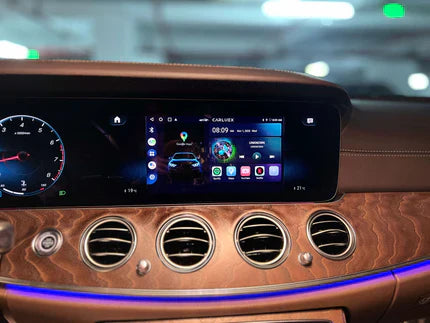
Quick answer: You do not download Apple CarPlay as a separate app from the App Store. CarPlay is built into compatible iPhones and works only when your iPhone connects to a compatible car or stereo. If your old car does not support CarPlay, you need a compatible vehicle system, aftermarket head unit, or the right adapter path depending on what your car already supports.
Safety note: Set up CarPlay, pair devices, and change iPhone or vehicle settings only while parked. Do not troubleshoot CarPlay while driving.
| User question | Real answer | What to check |
|---|---|---|
| Can I download Apple CarPlay? | No separate CarPlay app is needed | Compatible iPhone, iOS, and vehicle support |
| Can I add CarPlay to an old car? | Sometimes, with the right hardware | Factory screen, aftermarket head unit, or adapter requirements |
| Can an adapter add CarPlay to any car? | No, compatibility matters | Whether wired CarPlay already works or the product supports your setup |
| Can Android phones use Apple CarPlay? | No, Android phones use Android Auto instead | Phone type and vehicle projection support |
Can You Download Apple CarPlay?
No. Apple CarPlay is not a standalone app that you download and install like a normal iPhone app. Apple describes CarPlay as a way to use supported iPhone features through your car's built-in display in its official CarPlay overview. The feature is part of iOS on compatible iPhones, but it only appears when your iPhone connects to a compatible car or stereo.
If CarPlay is not showing up, the issue is usually one of these: the vehicle does not support CarPlay, the iPhone is not connected correctly, Siri or CarPlay permissions are blocked, the cable or USB port is wrong, or the car system needs an update.

What You Need to Use Apple CarPlay
To use CarPlay, you need three things: a compatible iPhone, a compatible vehicle or stereo, and the correct wired or wireless connection method. Apple provides an official CarPlay available models list for checking vehicle support.
- A compatible iPhone: CarPlay works with supported iPhone models. Keep iOS updated for the best compatibility.
- A compatible car or stereo: Check your vehicle manual, manufacturer support page, or Apple's available models list.
- Siri enabled: CarPlay relies on Siri for voice control and some hands-free functions.
- The right connection: Some cars use USB only, some support factory wireless CarPlay, and some require an initial wired setup before wireless use.
On iPhone, open Settings and search for Siri. Make sure Siri is enabled. The exact label can vary by iOS version.
How to Set Up CarPlay in a Compatible Car
Apple's iPhone User Guide explains that you can connect to CarPlay through the vehicle's USB port or wireless capability, depending on the car. See Apple's official Connect iPhone to CarPlay guide for the current setup steps.
- Start your car and keep it parked.
- Make sure Siri is enabled on your iPhone.
- For wired CarPlay, connect your iPhone to the CarPlay USB port with a data-capable cable.
- For factory wireless CarPlay, turn on Bluetooth and Wi-Fi, then follow the vehicle pairing prompt.
- If CarPlay does not appear, check the car's phone projection settings and the iPhone CarPlay settings.

Can You Add CarPlay to an Old Car?
Maybe. The right path depends on what your car already has. If the car has no CarPlay support at all, you may need an aftermarket CarPlay head unit or vehicle-specific retrofit solution. If the car already has factory wired CarPlay, a wireless adapter may be enough to make the connection wireless.
| Your car's current setup | Possible upgrade path | Important limitation |
|---|---|---|
| No CarPlay support | Aftermarket head unit or retrofit kit | Requires vehicle-specific compatibility and installation |
| Factory wired CarPlay works | Wireless CarPlay adapter | Adapter does not repair unsupported CarPlay |
| Factory wired CarPlay and Android Auto work | Wireless CarPlay/Android Auto adapter | Check both protocols and product requirements |
| BMW or other vehicle-specific system | Vehicle-specific product or retrofit | Do not assume a universal adapter is the right fit |
Do Not Confuse CarPlay, Android Auto, and Adapters
Apple CarPlay is for iPhone. Android Auto is for Android phones. A wireless adapter is a connection accessory, not the CarPlay software itself. If you use an Android phone, you cannot download Apple CarPlay onto it; you should check Android Auto support instead.
Likewise, a wireless CarPlay adapter does not make every car support CarPlay. Many adapters require factory wired CarPlay to already work. If wired CarPlay fails, fix the car, cable, iPhone setting, or vehicle software problem first.
When Does a CARLUEX Adapter Help?
A wireless adapter may help after wired CarPlay already works. It does not fix unsupported vehicles, damaged USB ports, blocked iPhone settings, or vehicle software problems.
CARLUEX compatibility depends on the adapter model and your vehicle's factory infotainment system. Many CARLUEX adapters require factory wired CarPlay, while wireless Android Auto support may require factory wired Android Auto on selected models.
- Check CARLUEX LINK if you want a compact wireless CarPlay and Android Auto adapter for a compatible factory wired setup.
- Compare CARLUEX AIR if you want wireless CarPlay and Android Auto with additional adapter features in a compatible vehicle.
- Review CARLUEX PRO+ 2.0 if you are considering a multimedia AI box for a compatible factory wired CarPlay vehicle.
- Check CARLUEX compatible vehicles before purchasing or contact support if your vehicle is not listed.
Before buying, confirm your vehicle year, make, model, factory infotainment system, and whether wired CarPlay already works. This matters more than the phrase "download CarPlay."

Why CarPlay May Not Show Up After Setup
If CarPlay does not appear after you connect your iPhone, Apple recommends checking the connection, Siri, CarPlay restrictions, and vehicle setup. Apple's official CarPlay troubleshooting page is the best source for current steps.
- Use a data-capable USB cable for wired CarPlay.
- Try the USB port labeled for smartphone projection or CarPlay.
- On iPhone, open Settings and search for CarPlay to check saved vehicles.
- Search iPhone Settings for Siri and make sure it is enabled.
- Remove the saved vehicle from the iPhone and the car, then reconnect while parked.
- Update iOS and check the vehicle manufacturer's software update guidance.
Can You Download CarPlay Apps?
You do not download CarPlay itself, but you can install iPhone apps that support CarPlay, such as navigation, music, podcast, audiobook, messaging, EV charging, parking, or calling apps. If an app supports CarPlay, it may appear on the car display after your iPhone connects.
App availability depends on the app developer, your country or region, your iOS version, and Apple's CarPlay app rules. Install apps on the iPhone first, then organize the CarPlay display from iPhone settings if the option appears.

Related CARLUEX Guides
- How to Use Apple CarPlay: Setup, Tips & Fixes
- Apple CarPlay Price: Costs, Options & Upgrades
- Cars with Apple CarPlay: Check Models & Compatibility
- Why Your Apple CarPlay Isn't Working and How to Fix It
FAQ
Is Apple CarPlay an app I can download?
No. CarPlay is built into compatible iPhones and appears when the iPhone connects to a compatible car or stereo. You do not download it as a separate App Store app.
Why can I not find Apple CarPlay in the App Store?
Because CarPlay is not a standalone app. Check your iPhone settings, vehicle compatibility, cable, wireless pairing, and vehicle infotainment settings instead.
Can I add Apple CarPlay to an old car?
Sometimes. If your car does not have CarPlay, you may need an aftermarket head unit or retrofit kit. If your car already has factory wired CarPlay, a compatible wireless adapter may add wireless convenience.
Can Android phones use Apple CarPlay?
No. Apple CarPlay is for iPhone. Android phones use Android Auto if the phone and vehicle support it.
Does a wireless adapter add CarPlay to any car?
No. Many wireless adapters require factory wired CarPlay to already work. Always check the adapter product page and compatible vehicles list before buying.
Bottom line: You do not need an Apple CarPlay download. You need a compatible iPhone, a compatible car or stereo, and the right connection method. If your old car already has working wired CarPlay, a compatible CARLUEX adapter may make it wireless; if the car has no CarPlay support, you may need a different upgrade path.


Napsat komentář
Tento web je chráněn službou hCaptcha a vztahují se na něj Zásady ochrany osobních údajů a Podmínky služby společnosti hCaptcha.