
PRO PLUS

How Can I Organize Apps?

To organize your apps on CARLUEX PRO+, follow these steps:

  1. Long-press on the app icon you want to organize.
  2. Drag and drop it onto another app icon. This action will create a folder.
  3. You can also give the folder a name to categorize the apps within it.
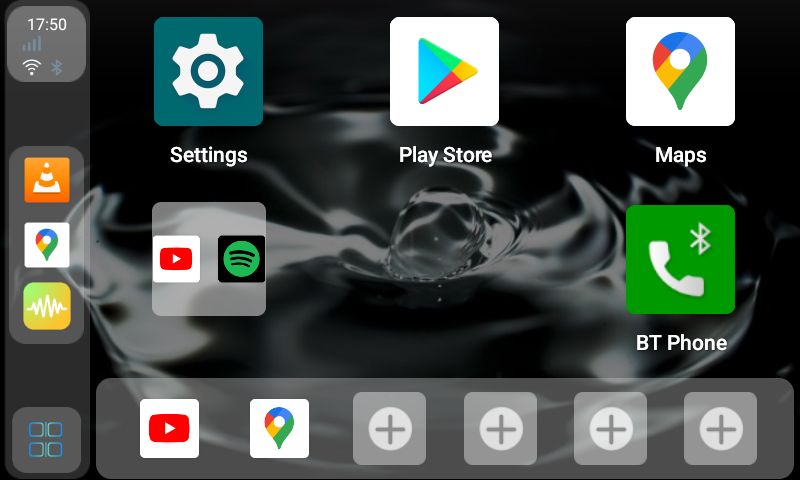
By creating folders and categorizing your apps, you can keep your CARLUEX PRO+ interface neat and well-organized, making it easier to access your desired applications.

You can also check out the tutorial video here ⇒ https://youtube.com/shorts/9GlMc1vAK34?feature=share

Te-ar putea interesa

Lasă un comentariu

Acest site este protejat de hCaptcha și hCaptcha. Se aplică Politica de confidențialitate și Condițiile de furnizare a serviciului.

Recommended CARLUEX products

CARLUEX PRO PLUS 2.0 Black Friday 2026

CARLUEX® PRO+ 2.0 Multimedia AI Box

A multimedia AI box that adds wireless CarPlay and Android Auto, 4K playback, app installation, and OTA updates to compatible vehicles.

Preț redusDe la Dhs. 652.00 AED Preț normalDhs. 1,264.00 AED
View product
CARLUEX for BMW Black Friday 2026

CARLUEX Multimedia Streaming Box for BMW

A BMW-focused multimedia box with wireless CarPlay and Android Auto, streaming apps, voice commands, and steering-wheel control.

Preț redusDe la Dhs. 922.00 AED Preț normalDhs. 1,376.00 AED
View product
CARLUEX MORPH Black Friday 2026

CARLUEX MORPH Digital Car Emblem for Select BMW Models

An app-controlled digital BMW emblem that lets you switch designs, images, animations, or text on supported models.

Preț redusDhs. 891.00 AED Preț normalDhs. 1,115.00 AED
View product


