

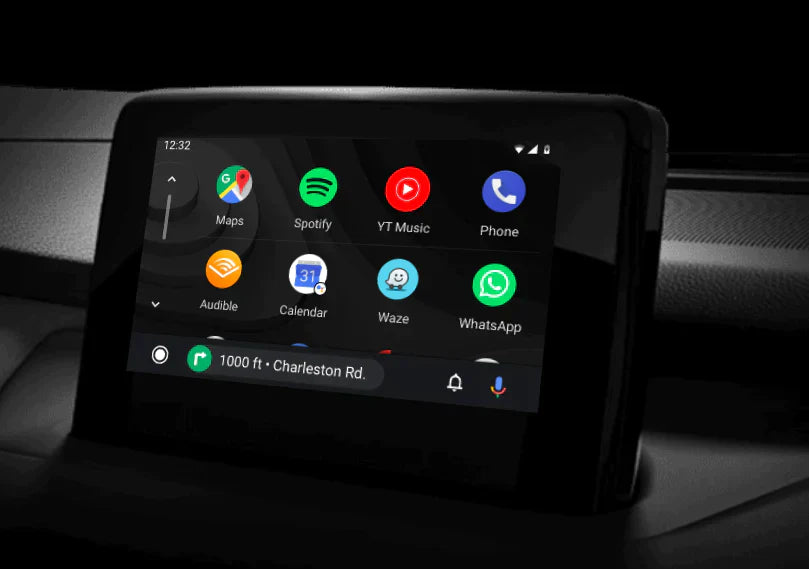
Many Android users struggle with phone mounts, tangled charging cables, and unsafe distractions while navigating, calling, or streaming music on the road. CarLuex's Android Auto adapter transforms any car display into a seamless Android extension, letting you navigate, call, and stream hands-free — without touching your phone.
In this guide, we cover everything Android drivers need to know about bringing Android Auto to their car with CarLuex.
What Problems Does Android Auto Solve for Drivers?
If you've ever fumbled with your phone at a red light, dealt with a dangling USB cable, or missed a turn because you couldn't safely look at your GPS, you know how dangerous and frustrating in-car phone use can be. Android Auto addresses these pain points by projecting your favorite apps onto your car's built-in display, enabling voice control via Google Assistant for calls, messages, and navigation, replacing your phone's small screen with a large dashboard-mounted display, and keeping your hands on the wheel and your eyes on the road.
How Does CarLuex Bring Android Auto to Any Car?
CarLuex is a powerful 8-core chip adapter that connects to your car's display screen via HDMI and USB, projecting a clean, responsive Android Auto interface in minutes. Unlike built-in Android Auto systems that require factory installation, CarLuex works with virtually any car that has a display screen.
- 8-core processor for smooth, lag-free performance
- Plug-and-play setup in under 5 minutes — no professional installation required
- Compatible with over 500+ car models worldwide
- Supports both wired USB and wireless Android Auto connections
- Works with Android phones running Android 11 and above
What Apps Are Compatible with CarLuex Android Auto?
CarLuex supports the full suite of Android Auto-compatible apps:
- Navigation: Google Maps, Waze, Apple Maps (via side-loading)
- Music and Podcasts: Spotify, YouTube Music, Pandora, Audible, Podcast Addict
- Messaging: WhatsApp, Telegram, Google Messages (voice-activated)
- News and Weather: NPR, BBC News, AccuWeather
How to Install CarLuex in Minutes
One of the biggest advantages of CarLuex over built-in systems is the simplicity of installation:
- Connect the CarLuex adapter to your car's display screen via HDMI cable
- Plug the USB power cable into your car's USB port or 12V adapter
- Connect your Android phone via USB cable or pair via Bluetooth for wireless use
- Follow the on-screen prompts to grant permissions — and you're ready to go
Total installation time: approximately 5 minutes.
Is CarLuex Worth It? Here's What Drivers Say
Thousands of Android drivers have upgraded their cars with CarLuex, citing improved safety, better navigation, and a dramatically better music streaming experience. Unlike factory-installed Android Auto systems that can cost hundreds to upgrade, CarLuex offers a fraction of the price with the same — or better — functionality.
Frequently Asked Questions
Does CarLuex work with all Android phones?
CarLuex supports Android phones running Android 11 or higher, including Samsung Galaxy, Google Pixel, OnePlus, Xiaomi, and most other Android devices.
Is wireless Android Auto supported?
Yes. CarLuex supports both wired USB connection and wireless Bluetooth/Wi-Fi Direct connection for cable-free Android Auto use.
How long does installation take?
Most users complete the installation in under 5 minutes. No technical expertise or professional help is required.
What if my car is not on the compatibility list?
CarLuex works with any car that has an HDMI input and a display screen. If you're unsure, contact our support team for a compatibility check.
Does CarLuex come with a warranty?
Yes. All CarLuex products include a 12-month limited warranty and 30-day money-back guarantee.
Ready to upgrade your Android driving experience? Check out CarLuex Android Auto products and start enjoying seamless, hands-free connectivity today.


Commenta
Nota che i commenti devono essere approvati prima di essere pubblicati.
Questo sito è protetto da hCaptcha e applica le Norme sulla privacy e i Termini di servizio di hCaptcha.