
PRO PLUS

How to Adjust Screen Font and Icon Size on CARLUEX PRO+

To adjust the screen font and icon size on CARLUEX PRO+, follow these steps:

  1. Access the "Settings" menu.
  2. Scroll down slightly or use the search function to find the "Display" section.
  3. Click on "Display size and text."
  4. Use the sliders for "Font size" or "Display size" to set them to your preferred size.
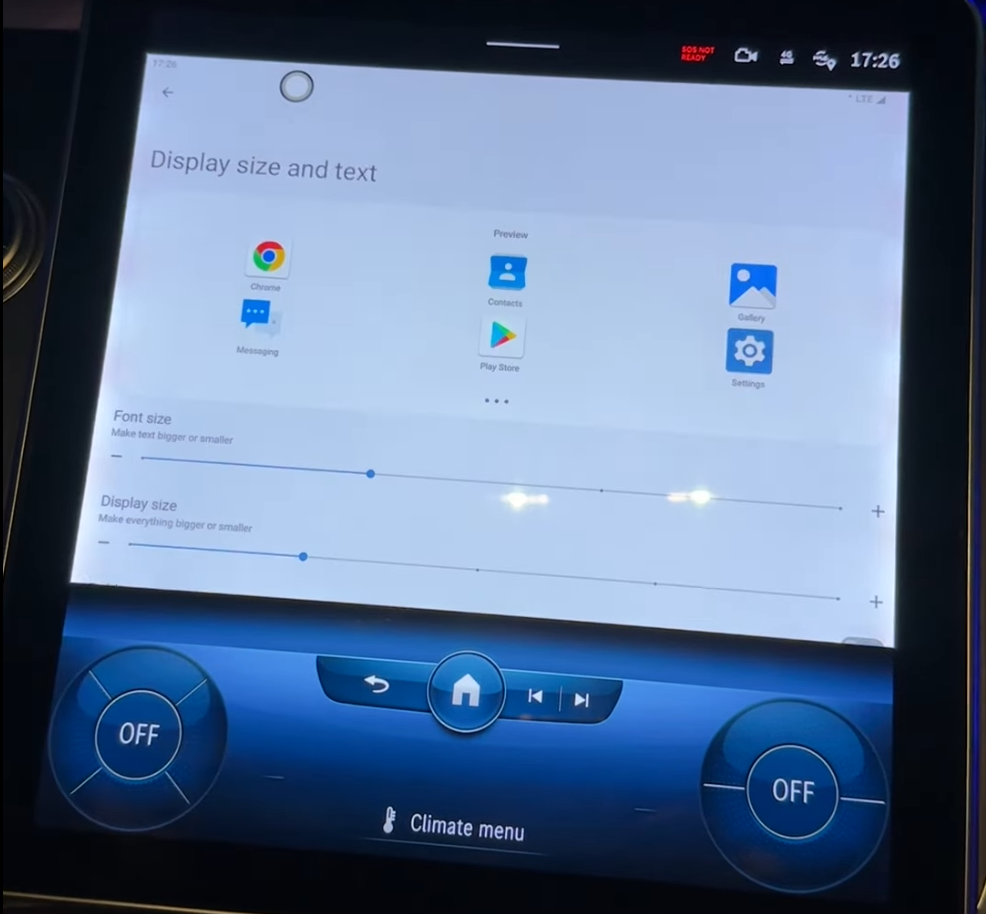
For a visual guide, you can also refer to this video tutorial: Screen Font and Icon Size Adjustment Tutorial

Puede que te interese

Dejar un comentario

Este sitio está protegido por hCaptcha y se aplican la Política de privacidad de hCaptcha y los Términos del servicio.

Recommended CARLUEX products

CARLUEX PRO PLUS 2.0 Black Friday 2026

CARLUEX® PRO+ 2.0 Multimedia AI Box

A multimedia AI box that adds wireless CarPlay and Android Auto, 4K playback, app installation, and OTA updates to compatible vehicles.

Precio de ofertaDesde €162,95 EUR
View product
CARLUEX for BMW Black Friday 2026

CARLUEX Multimedia Streaming Box for BMW

A BMW-focused multimedia box with wireless CarPlay and Android Auto, streaming apps, voice commands, and steering-wheel control.

Precio de ofertaDesde €229,95 EUR
View product


