
PRO PLUS

How to Avoid Accidentally Setting the Lock Screen on Your CARLUEX PRO+

To prevent accidentally setting the lock screen on CARLUEX PRO+, follow these steps:

  1. Access the "Settings" menu.
  2. Search for the "Screen Lock" section.
  3. Ensure that your screen lock is set to "None."
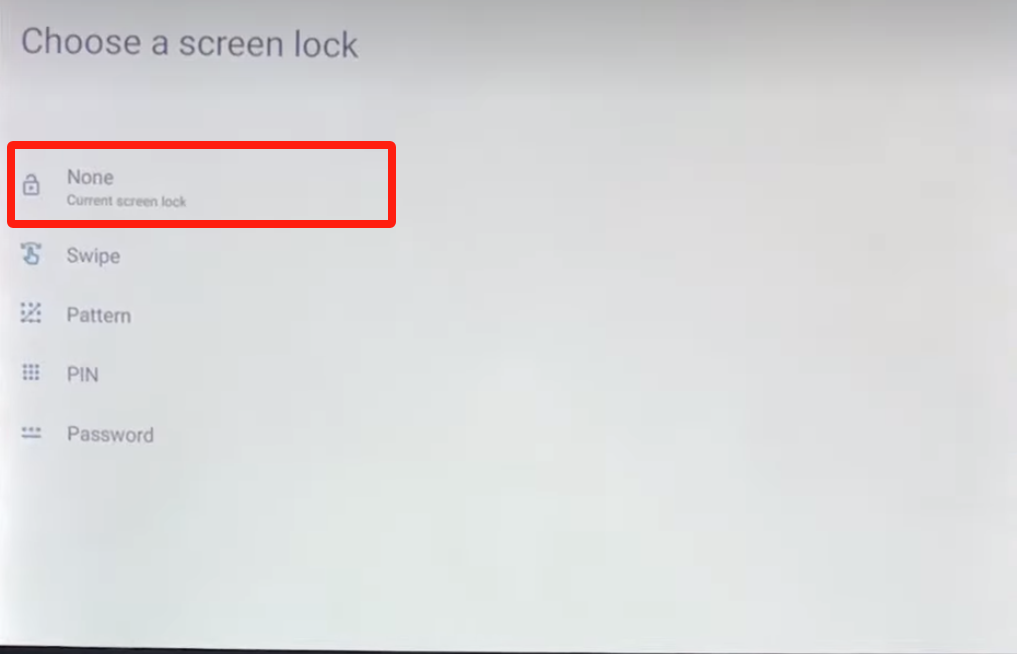
Unless you have specific reasons, such as preventing children from tampering with the device, it's generally recommended not to set any form of screen lock, as it can sometimes lead to inconveniences.

For a visual guide, you can also refer to this video tutorial: Lock Screen Avoidance Tutorial

Weiterlesen

Hinterlasse einen Kommentar

Diese Website ist durch hCaptcha geschützt und es gelten die allgemeinen Geschäftsbedingungen und Datenschutzbestimmungen von hCaptcha.

Recommended CARLUEX products

CARLUEX PRO PLUS 2.0 Black Friday 2026

CARLUEX® PRO+ 2.0 Multimedia AI Box

A multimedia AI box that adds wireless CarPlay and Android Auto, 4K playback, app installation, and OTA updates to compatible vehicles.

Angebotab Dhs. 652.00 AED Regulärer PreisDhs. 1,264.00 AED
View product
CARLUEX for BMW Black Friday 2026

CARLUEX Multimedia Streaming Box for BMW

A BMW-focused multimedia box with wireless CarPlay and Android Auto, streaming apps, voice commands, and steering-wheel control.

Angebotab Dhs. 922.00 AED Regulärer PreisDhs. 1,376.00 AED
View product
CARLUEX MORPH Black Friday 2026

CARLUEX MORPH Digital Car Emblem for Select BMW Models

An app-controlled digital BMW emblem that lets you switch designs, images, animations, or text on supported models.

AngebotDhs. 891.00 AED Regulärer PreisDhs. 1,115.00 AED
View product


