
PRO PLUS

How Can I Organize Apps?

To organize your apps on CARLUEX PRO+, follow these steps:

  1. Long-press on the app icon you want to organize.
  2. Drag and drop it onto another app icon. This action will create a folder.
  3. You can also give the folder a name to categorize the apps within it.
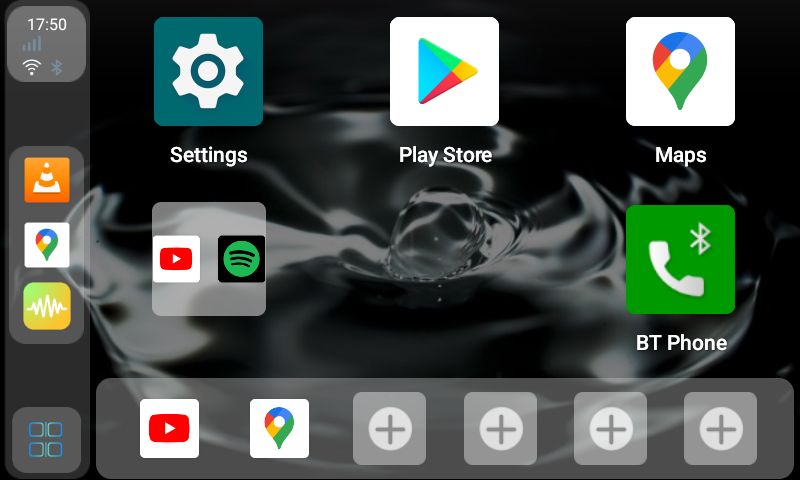
By creating folders and categorizing your apps, you can keep your CARLUEX PRO+ interface neat and well-organized, making it easier to access your desired applications.

You can also check out the tutorial video here ⇒ https://youtube.com/shorts/9GlMc1vAK34?feature=share

Zobrazit další

Napsat komentář

Tento web je chráněn službou hCaptcha a vztahují se na něj Zásady ochrany osobních údajů a Podmínky služby společnosti hCaptcha.

Recommended CARLUEX products

CARLUEX PRO PLUS 2.0 Black Friday 2026

CARLUEX® PRO+ 2.0 Multimedia AI Box

A multimedia AI box that adds wireless CarPlay and Android Auto, 4K playback, app installation, and OTA updates to compatible vehicles.

Prodejní cenaOd $5,852.00 TWD Běžná cena$11,344.00 TWD
View product
CARLUEX for BMW Black Friday 2026

CARLUEX Multimedia Streaming Box for BMW

A BMW-focused multimedia box with wireless CarPlay and Android Auto, streaming apps, voice commands, and steering-wheel control.

Prodejní cenaOd $8,273.00 TWD Běžná cena$12,348.00 TWD
View product
CARLUEX MORPH Black Friday 2026

CARLUEX MORPH Digital Car Emblem for Select BMW Models

An app-controlled digital BMW emblem that lets you switch designs, images, animations, or text on supported models.

Prodejní cena$7,998.00 TWD Běžná cena$10,006.00 TWD
View product


