

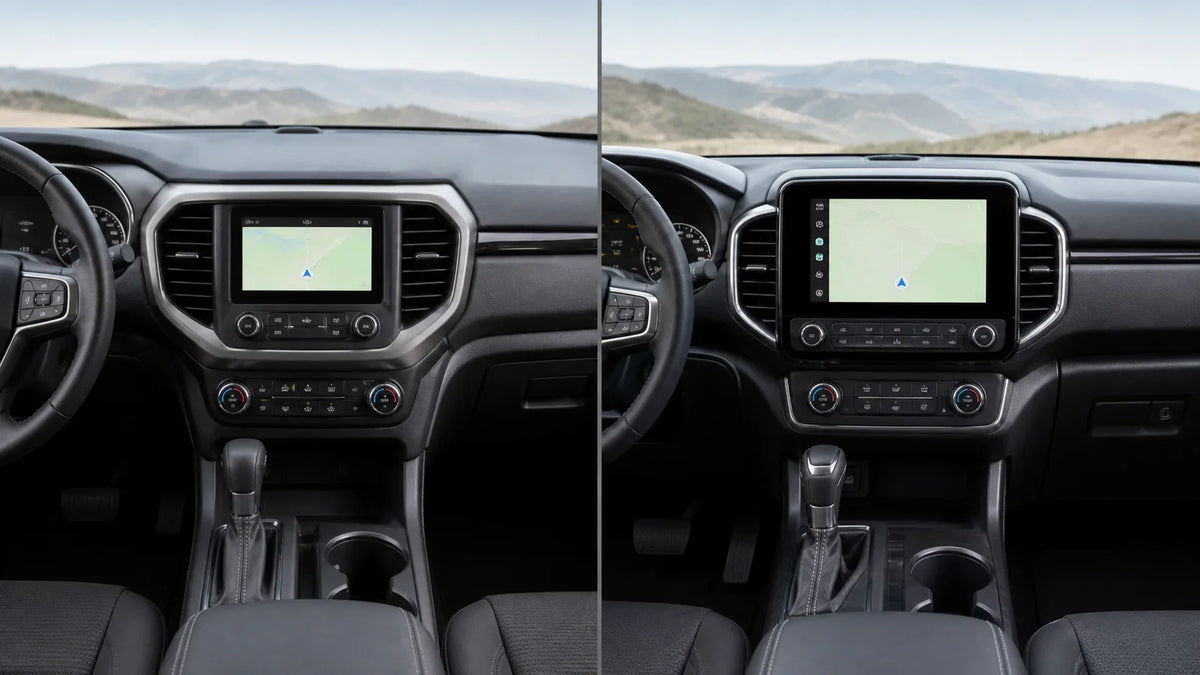
2027 Mazda CX-90 Infotainment: Wireless CarPlay by Trim
Quick answer: Mazda's October 27, 2026 US release says every 2027 CX-90 model has Mazda Connect with Apple CarPlay and Android Auto integration, while selected trims add a larger 12.3-inch display and explicitly listed wireless connectivity. The useful detail is the trim wording: the release does not support assuming that every grade, phone, market, or used vehicle has the same wireless setup.
The 2027 CX-90 also introduces new two-row configurations on named Premium Sport trims, which makes an exact trim check more important. Read the official Mazda US release as a package-and-equipment reference, not as a substitute for the window sticker, owner's documentation, or the exact vehicle screen in front of you.
Safety note: Check menus, pair a phone, and change infotainment settings only when the vehicle is parked. Do not adjust phone or vehicle settings while driving.

What Mazda's 2027 CX-90 infotainment release confirms
Mazda's US newsroom describes the 2027 CX-90 as using a Mazda Connect infotainment system with a 10.25-inch full-color center display and Apple CarPlay and Android Auto integration across the lineup. That is the baseline statement in the release. It gives a useful starting point for research, but the word “integration” should not automatically be rewritten as “wireless” for every grade.
The same release says the CX-90 line expands with two-row versions of the CX-90 3.3 Turbo Premium Sport and CX-90 3.3 Turbo S Premium Sport. Mazda says those two-row versions replace the CX-70 in the U.S. market. The seating change is not itself a phone-projection specification, but it is another reason to record the exact package and configuration before comparing equipment.
For the source wording, equipment descriptions, and the new model-year context, use the Mazda 2027 CX-90 pricing and packaging release. It is the primary source used for the trim distinctions in this article.
Wireless CarPlay and Android Auto by named trim
Mazda's release is more specific when it reaches selected higher trims. The 2027 CX-90 3.3 Turbo Preferred description names a larger 12.3-inch full-color infotainment display with wireless Apple CarPlay and Android Auto, touchscreen capability, and wireless phone charging. The 2027 CX-90 PHEV Preferred description also names a 12.3-inch center display and wireless Apple CarPlay and Android Auto integration with touchscreen capability.
The 2027 CX-90 3.3 Turbo S Premium Sport description likewise names a 12.3-inch full-color display with wireless Apple CarPlay and Android Auto integration. Other equipment descriptions in the release use different wording, so the safe summary is “wireless is explicitly listed on the named trims above,” not “wireless is proven for every CX-90 grade.”
That distinction is especially useful when an online listing or dealer summary shortens the vehicle name to “CX-90.” A model family can contain multiple powertrains, packages, screen sizes, and seating layouts. If the source does not explicitly state wireless projection for the exact configuration, mark that point as needing confirmation.

A practical trim note is therefore:
- 10.25-inch baseline: Mazda describes Mazda Connect with Apple CarPlay and Android Auto integration as standard across the 2027 CX-90 line.
- 12.3-inch and wireless wording: Mazda explicitly names wireless Apple CarPlay and Android Auto on the 3.3 Turbo Preferred, PHEV Preferred, and 3.3 Turbo S Premium Sport descriptions.
- Unlisted combinations: Do not fill gaps in the release by guessing that every other trim has the same wireless feature or screen size.
Connected features that are separate from phone projection
The 2027 CX-90 release also mentions connected features that should be kept separate from Apple CarPlay and Android Auto. Alexa Built-In is described as standard on the 3.3 Turbo Premium Sport and the PHEV Premium Sport. Mazda Online Navigation is described as standard on the 3.3 Turbo Premium Plus and PHEV Premium Plus.
Those features can matter when comparing the factory interface, but they do not answer every phone-projection question. A vehicle can have a built-in assistant or connected navigation and still have separate requirements for phone pairing, account access, data service, or wireless projection. Conversely, wireless Apple CarPlay or Android Auto does not by itself prove that every connected service is available.

Use the official Mazda trim description for the feature you are checking, then confirm the exact vehicle documentation. This avoids combining separate rows from a package guide into a single feature promise.
What this release does not prove about Google built-in or adapters
The recent CX-5 announcements and the 2027 CX-90 release should not be merged. The Mazda release used here discusses Mazda Connect, Apple CarPlay, Android Auto, Alexa Built-In, Mazda Online Navigation, display sizes, and trim packaging for the CX-90. It does not establish that the 2027 CX-90 has the same Google built-in or Google Gemini scope described in a separate Mazda CX-5 announcement.
It also does not establish that an aftermarket adapter can add native vehicle functions, Alexa Built-In, Mazda Online Navigation, Google Gemini, or any other factory-level feature. The official Google explanation of Android Auto and cars with Google built-in treats them as distinct in-car experiences. That distinction is a useful guardrail when reading product pages or forum posts.
For phone projection itself, Google's Android Auto Help says that a compatible car or stereo and compatible phone are required, with additional requirements for wireless use. The official Android Auto overview makes the same car-and-phone boundary clear.

The result is a simple rule: factory wireless projection, phone projection, and native vehicle software are related but not interchangeable labels. Check them as separate rows before deciding whether any accessory is relevant.
A parked-only 2027 CX-90 infotainment checklist
If you are reviewing a 2027 CX-90 listing or sitting in the vehicle, use this sequence while parked:
- Write down the exact configuration. Record the model year, powertrain, trim, seating layout, and market. “CX-90” alone is not enough for a trim-level equipment check.
- Record the display size. Mazda's release distinguishes the 10.25-inch baseline from named trims with a 12.3-inch display. Compare the actual screen and documentation with the listing.
- Look for explicit wireless wording. Give more weight to a source that specifically says wireless Apple CarPlay and Android Auto for the exact trim than to a general statement that the vehicle supports phone integration.
- Check the phone side separately. Verify the phone model, operating system, account, region, and connection method against the current Android Auto or Apple requirements. Do not assume a factory feature removes phone-side requirements.
- Keep aftermarket questions conditional. If you are evaluating a product, first review the CARLUEX compatible vehicles reference and the exact factory requirements. If the trim or head-unit state is unclear, use the CARLUEX Help Center as a support reference rather than treating the product as automatically compatible.

A separate hardware option such as CARLUEX PRO+ 2.0 should be treated as a conditional evaluation reference only. The Mazda source used for this article does not verify that product's compatibility with a particular 2027 CX-90 configuration, and this article does not claim that an adapter adds the factory Mazda features described above.
These CARLUEX links are not a recommendation or a substitute for the factory equipment check. Consider them only after the exact vehicle, trim, display, and connection mode are confirmed.
Frequently asked questions
Is wireless CarPlay standard on every 2027 Mazda CX-90?
Not based on the wording reviewed here. Mazda explicitly names wireless Apple CarPlay and Android Auto on selected trim descriptions, including the 3.3 Turbo Preferred, PHEV Preferred, and 3.3 Turbo S Premium Sport. The safe approach is to verify the exact grade instead of extending that statement to every CX-90.
Does every 2027 CX-90 have the same infotainment screen?
No. Mazda describes a 10.25-inch full-color center display across the line and a larger 12.3-inch display on named trims. Check the exact trim and package rather than relying on the model name alone.
Does the 2027 CX-90 release confirm Google built-in or Gemini?
No such conclusion is established by the Mazda CX-90 release used here. It discusses Mazda Connect, Apple CarPlay, Android Auto, Alexa Built-In, Mazda Online Navigation, and display equipment. Do not transfer Google built-in or Gemini claims from a different Mazda model without a CX-90-specific source.
Can an aftermarket adapter add wireless projection to any CX-90?
The release does not prove that. Adapter compatibility depends on the exact factory system and connection mode, and any product must be checked against that configuration. A factory wireless feature may also mean that an adapter is unnecessary for the use case being considered.
Can I change infotainment settings while driving?
No. Change settings, pair devices, and compare menus only when the vehicle is parked. Do not adjust phone or infotainment settings while driving.
Related CARLUEX reading
For adjacent compatibility context, read 2021 Mazda6 Wired CarPlay Works but Wireless Does Not, In-Car Entertainment Trends: What Drivers Can Use Now, and Is Apple CarPlay Going Away? Automaker Changes Explained. These articles provide related platform and compatibility context; they do not replace the exact Mazda trim or Google source check for this vehicle.


اترك تعليقًا
This site is protected by hCaptcha and the hCaptcha Privacy Policy and Terms of Service apply.